

DuckDB (Native)#
Note
JupySQL also supports DuckDB via SQLAlchemy, to learn more, see the tutorial. To learn the differences, click here.
JupySQL integrates with DuckDB so you can run SQL queries in a Jupyter notebook. Jump into any section to learn more!
Pre-requisites for .csv file#
%pip install jupysql duckdb --quiet
Note: you may need to restart the kernel to use updated packages.
import duckdb

%load_ext sql
conn = duckdb.connect()
%sql conn --alias duckdb
Load sample data#
Get a sample .csv file:
from urllib.request import urlretrieve

_ = urlretrieve(
    "https://raw.githubusercontent.com/mwaskom/seaborn-data/master/penguins.csv",
    "penguins.csv",
)
Query#
The data from the .csv file must first be registered as a table in order for the table to be listed.
%%sql
CREATE TABLE penguins AS SELECT * FROM penguins.csv
| Count |
|---|
| 344 |
%%sql
SELECT *
FROM penguins.csv
LIMIT 3
| species | island | bill_length_mm | bill_depth_mm | flipper_length_mm | body_mass_g | sex |
|---|---|---|---|---|---|---|
| Adelie | Torgersen | 39.1 | 18.7 | 181 | 3750 | MALE |
| Adelie | Torgersen | 39.5 | 17.4 | 186 | 3800 | FEMALE |
| Adelie | Torgersen | 40.3 | 18.0 | 195 | 3250 | FEMALE |
%%sql
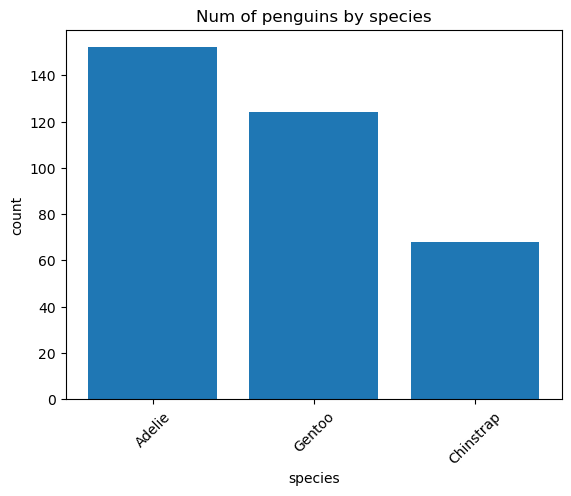
SELECT species, COUNT(*) AS count
FROM penguins.csv
GROUP BY species
ORDER BY count DESC
| species | count |
|---|---|
| Adelie | 152 |
| Gentoo | 124 |
| Chinstrap | 68 |
Plotting#
%%sql species_count <<
SELECT species, COUNT(*) AS count
FROM penguins.csv
GROUP BY species
ORDER BY count DESC
ax = species_count.bar()
# customize plot (this is a matplotlib Axes object)
_ = ax.set_title("Num of penguins by species")
/home/docs/checkouts/readthedocs.org/user_builds/jupysql/checkouts/938/src/sql/run/resultset.py:371: UserWarning: .bar() is deprecated and will be removed in a future version. Use %sqlplot bar instead. For more help, find us at https://ploomber.io/community
  warnings.warn(
Pre-requisites for .parquet file#
%pip install jupysql duckdb pyarrow --quiet
%load_ext sql
conn = duckdb.connect()
%sql conn --alias duckdb
Note: you may need to restart the kernel to use updated packages.
The sql extension is already loaded. To reload it, use:
  %reload_ext sql
Load sample data#
Get a sample .parquet file:
from urllib.request import urlretrieve

_ = urlretrieve(
    "https://d37ci6vzurychx.cloudfront.net/trip-data/yellow_tripdata_2021-01.parquet",
    "yellow_tripdata_2021-01.parquet",
)
Query#
Identically, to list the data from a .parquet file as a table, the data must first be registered as a table.
%%sql
CREATE TABLE tripdata AS SELECT * FROM "yellow_tripdata_2021-01.parquet"
| Count |
|---|
| 1369769 |
%%sql
SELECT tpep_pickup_datetime, tpep_dropoff_datetime, passenger_count
FROM "yellow_tripdata_2021-01.parquet"
LIMIT 3
| tpep_pickup_datetime | tpep_dropoff_datetime | passenger_count |
|---|---|---|
| 2021-01-01 00:30:10 | 2021-01-01 00:36:12 | 1.0 |
| 2021-01-01 00:51:20 | 2021-01-01 00:52:19 | 1.0 |
| 2021-01-01 00:43:30 | 2021-01-01 01:11:06 | 1.0 |
%%sql
SELECT
    passenger_count, AVG(trip_distance) AS avg_trip_distance
FROM "yellow_tripdata_2021-01.parquet"
GROUP BY passenger_count
ORDER BY passenger_count ASC
| passenger_count | avg_trip_distance |
|---|---|
| 0.0 | 2.5424466811344635 |
| 1.0 | 2.6805563237139625 |
| 2.0 | 2.7948325921160815 |
| 3.0 | 2.757641060657793 |
| 4.0 | 2.8681984015618216 |
| 5.0 | 2.6940995207307994 |
| 6.0 | 2.5745177825092593 |
| 7.0 | 11.134 |
| 8.0 | 1.05 |
| None | 29.665125772734566 |
Plotting#
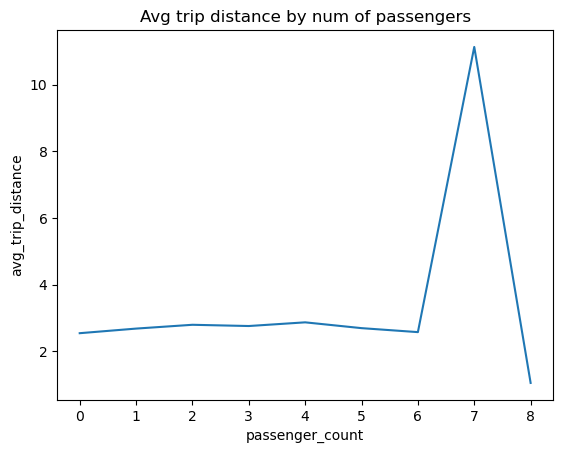
%%sql avg_trip_distance <<
SELECT
    passenger_count, AVG(trip_distance) AS avg_trip_distance
FROM "yellow_tripdata_2021-01.parquet"
GROUP BY passenger_count
ORDER BY passenger_count ASC
ax = avg_trip_distance.plot()
# customize plot (this is a matplotlib Axes object)
_ = ax.set_title("Avg trip distance by num of passengers")
/home/docs/checkouts/readthedocs.org/user_builds/jupysql/checkouts/938/src/sql/run/resultset.py:322: UserWarning: .plot() is deprecated and will be removed in a future version. For more help, find us at https://ploomber.io/community
  warnings.warn(
Load sample data from a SQLite database#
If you have a large SQlite database, you can use DuckDB to perform analytical queries it with much better performance.
%load_ext sql
The sql extension is already loaded. To reload it, use:
  %reload_ext sql
import urllib.request
from pathlib import Path

# download sample database
if not Path("my.db").is_file():
    url = "https://raw.githubusercontent.com/lerocha/chinook-database/master/ChinookDatabase/DataSources/Chinook_Sqlite.sqlite"  # noqa
    urllib.request.urlretrieve(url, "my.db")
We’ll use sqlite_scanner extension to load a sample SQLite database into DuckDB:
import duckdb

conn = duckdb.connect()
%sql conn
%%sql
INSTALL 'sqlite_scanner';
LOAD 'sqlite_scanner';
CALL sqlite_attach('my.db');
| Success |
|---|
%%sql
SELECT * FROM track LIMIT 5
| TrackId | Name | AlbumId | MediaTypeId | GenreId | Composer | Milliseconds | Bytes | UnitPrice |
|---|---|---|---|---|---|---|---|---|
| 1 | For Those About To Rock (We Salute You) | 1 | 1 | 1 | Angus Young, Malcolm Young, Brian Johnson | 343719 | 11170334 | 0.99 |
| 2 | Balls to the Wall | 2 | 2 | 1 | None | 342562 | 5510424 | 0.99 |
| 3 | Fast As a Shark | 3 | 2 | 1 | F. Baltes, S. Kaufman, U. Dirkscneider & W. Hoffman | 230619 | 3990994 | 0.99 |
| 4 | Restless and Wild | 3 | 2 | 1 | F. Baltes, R.A. Smith-Diesel, S. Kaufman, U. Dirkscneider & W. Hoffman | 252051 | 4331779 | 0.99 |
| 5 | Princess of the Dawn | 3 | 2 | 1 | Deaffy & R.A. Smith-Diesel | 375418 | 6290521 | 0.99 |
Plotting large datasets#
New in version 0.5.2.
This section demonstrates how we can efficiently plot large datasets with DuckDB and JupySQL without blowing up our machine’s memory. %sqlplot performs all aggregations in DuckDB.
Let’s install the required package:
%pip install jupysql duckdb pyarrow --quiet
Note: you may need to restart the kernel to use updated packages.
Now, we download a sample data: NYC Taxi data split in 3 parquet files:
N_MONTHS = 3

# https://www1.nyc.gov/site/tlc/about/tlc-trip-record-data.page
for i in range(1, N_MONTHS + 1):
    filename = f"yellow_tripdata_2021-{str(i).zfill(2)}.parquet"
    if not Path(filename).is_file():
        print(f"Downloading: {filename}")
        url = f"https://d37ci6vzurychx.cloudfront.net/trip-data/{filename}"
        urllib.request.urlretrieve(url, filename)
Downloading: yellow_tripdata_2021-02.parquet
Downloading: yellow_tripdata_2021-03.parquet
In total, this contains more then 4.6M observations:
%%sql
SELECT count(*) FROM 'yellow_tripdata_2021-*.parquet'
| count_star() |
|---|
| 4666630 |
Let’s use JupySQL to get a histogram of trip_distance across all 12 files:
%sqlplot histogram --table yellow_tripdata_2021-*.parquet --column trip_distance --bins 50
<Axes: title={'center': "'trip_distance' from 'yellow_tripdata_2021-*.parquet'"}, xlabel='trip_distance', ylabel='Count'>
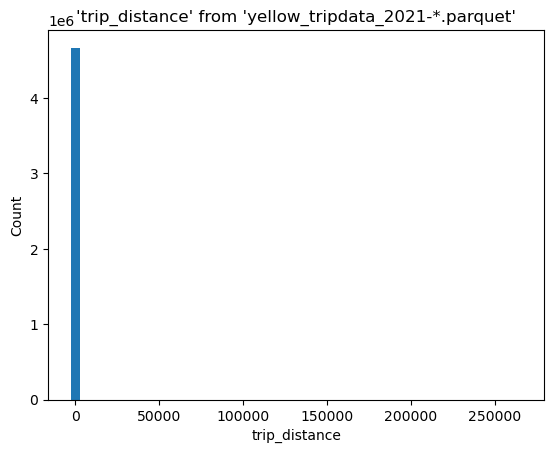
We have some outliers, let’s find the 99th percentile:
%%sql
SELECT percentile_disc(0.99) WITHIN GROUP (ORDER BY trip_distance)
FROM 'yellow_tripdata_2021-*.parquet'
| quantile_disc(0.99 ORDER BY trip_distance) |
|---|
| 18.93 |
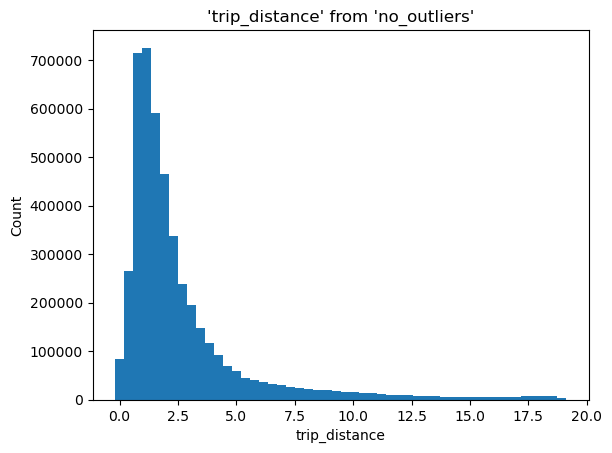
We now write a query to remove everything above that number:
%%sql --save no_outliers --no-execute
SELECT trip_distance
FROM 'yellow_tripdata_2021-*.parquet'
WHERE trip_distance < 18.93
%sqlplot histogram --table no_outliers --column trip_distance --bins 50
<Axes: title={'center': "'trip_distance' from 'no_outliers'"}, xlabel='trip_distance', ylabel='Count'>
Querying existing dataframes#
import pandas as pd
import duckdb

conn = duckdb.connect()
df = pd.DataFrame({"x": range(10)})
%sql conn
%%sql
SELECT *
FROM df
WHERE x > 4
| x |
|---|
| 5 |
| 6 |
| 7 |
| 8 |
| 9 |