

Snowflake#
Important
snowflake-sqlalchemy requires SQLAlchemy 1.x (as of version 1.4.7 )
Snowflake is a cloud-based data warehousing platform that provides organizations with a powerful and flexible solution for storing, managing, and analyzing large amounts of data. Unlike traditional data warehouses, Snowflake operates entirely in the cloud, utilizing a distributed architecture that allows it to process and store data across multiple computing resources.
In this guide, we’ll demonstrate how to integrate with Snowflake using JupySQL magics.
Tip
If you encounter any issues, feel free to join our community and we’ll be happy to help!
Pre-requisites#
We will need the snowflake-sqlalchemy package for connecting to the warehouse.
%pip install --upgrade snowflake-sqlalchemy 'sqlalchemy<2' --quiet
Note: you may need to restart the kernel to use updated packages.
Now let’s define the URL connection parameters and create an Engine object.
from sqlalchemy import create_engine
from snowflake.sqlalchemy import URL


engine = create_engine(
    URL(
        drivername="driver",
        user="user",
        password="password",
        account="account",
        database="database",
        role="role",
        schema="schema",
        warehouse="warehouse",
    )
)
Load sample data#
Now, let’s load the penguins dataset. We’ll convert this .csv file to a dataframe and create a table in Snowflake database from the data.
import urllib.request

urllib.request.urlretrieve(
    "https://raw.githubusercontent.com/mwaskom/seaborn-data/master/penguins.csv",
    "penguins.csv",
)
('penguins.csv', <http.client.HTTPMessage at 0x12ea1f100>)
%load_ext sql
%sql engine --alias connection
import pandas as pd

df = pd.read_csv("penguins.csv")
connection = engine.connect()
df.to_sql(name="penguins", con=connection, index=False, if_exists="replace")
344
Query#
List the tables in the database:
%sqlcmd tables
| Name |
|---|
| penguins |
List columns in the penguins table:
%sqlcmd columns --table penguins
| name | type | nullable | default | autoincrement | comment | primary_key |
|---|---|---|---|---|---|---|
| species | VARCHAR(16777216) | True | None | False | None | False |
| island | VARCHAR(16777216) | True | None | False | None | False |
| bill_length_mm | FLOAT | True | None | False | None | False |
| bill_depth_mm | FLOAT | True | None | False | None | False |
| flipper_length_mm | FLOAT | True | None | False | None | False |
| body_mass_g | FLOAT | True | None | False | None | False |
| sex | VARCHAR(16777216) | True | None | False | None | False |
Query our data:
%%sql
SELECT COUNT(*) FROM penguins
| COUNT(*) |
|---|
| 344 |
%%sql
SELECT species, COUNT(*) AS count
FROM penguins
GROUP BY species
ORDER BY count DESC
| species | count |
|---|---|
| Adelie | 152 |
| Gentoo | 124 |
| Chinstrap | 68 |
Parametrize queries#
JupySQL supports variable expansion in this format: {{variable}}.
dynamic_limit = 5
dynamic_column = "island, sex"
%sql SELECT {{dynamic_column}} FROM penguins LIMIT {{dynamic_limit}}
| island | sex |
|---|---|
| Torgersen | MALE |
| Torgersen | FEMALE |
| Torgersen | FEMALE |
| Torgersen | None |
| Torgersen | FEMALE |
CTEs#
Using JupySQL we can save query snippets, and use these saved snippets to form larger queries. Let’s see CTEs in action:
%%sql --save no_nulls --no-execute
SELECT *
FROM penguins
WHERE body_mass_g IS NOT NULL and
sex IS NOT NULL
%%sql
SELECT island, avg(body_mass_g) as avg_body_mass_g
FROM no_nulls
GROUP BY island;
Generating CTE with stored snippets : no_nulls
| island | avg_body_mass_g |
|---|---|
| Torgersen | 3708.5106382978724 |
| Biscoe | 4719.171779141105 |
| Dream | 3718.9024390243903 |
The query gets compiled like so:
final = %sqlcmd snippets no_nulls
print(final)
WITH
SELECT *
FROM penguins
WHERE body_mass_g IS NOT NULL and
sex IS NOT NULL
Plotting#
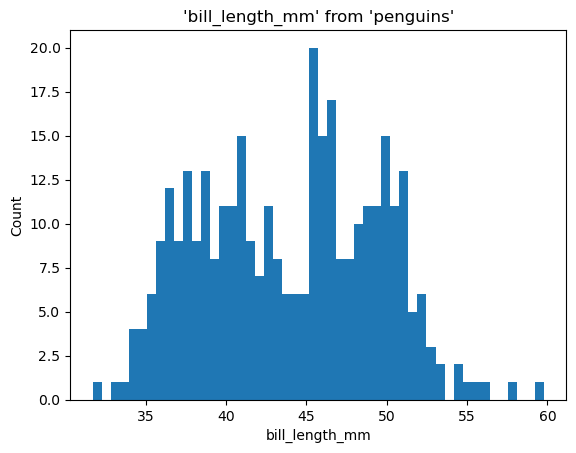
%sqlplot histogram --table penguins --column bill_length_mm
<Axes: title={'center': "'bill_length_mm' from 'penguins'"}, xlabel='bill_length_mm', ylabel='Count'>
Clean up#
To ensure that the Python connector closes the session properly, execute connection.close() before engine.dispose(). This prevents the garbage collector from removing the resources required to communicate with Snowflake.
connection.close()
engine.dispose()